
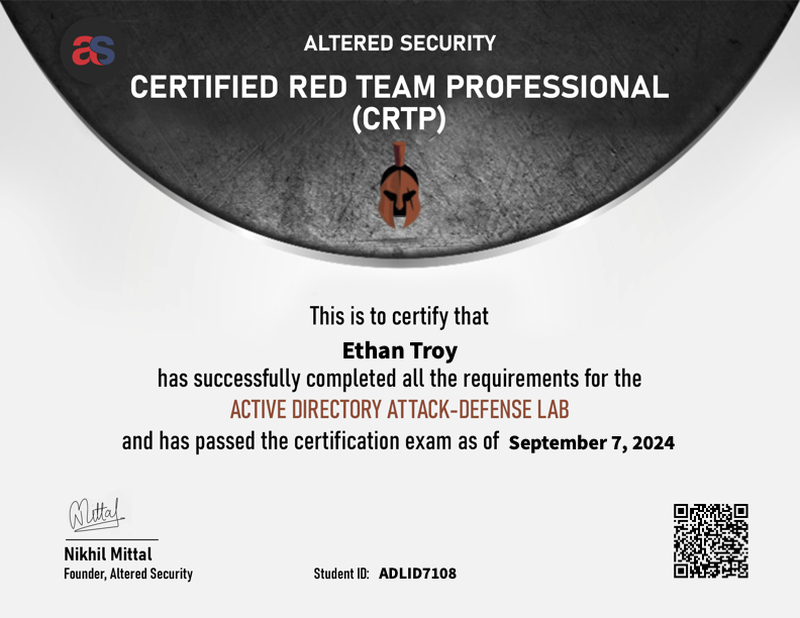
TL;DR#
- In my run: 24-hour hands-on exam1 + 48-hour report window, in an Active Directory environment with multiple domains and forests
- First attempt pass, roughly 8 to 16 hours of active working time
- Pretty good AD attack training for the price in practice
- Built the AD foundation I needed for OSCP and “real-world” pentesting
- The guide manual and lab environment are the real value. I skimmed the videos and jumped straight into the PDF and labs
| Item | Details |
|---|---|
| Provider | Altered Security |
| Certification | Certified Red Team Professional (CRTP) |
| Course | Attacking and Defending Active Directory |
| Instructor | Nikhil Mittal |
| Date | September 2024 |
| Result | Pass (1st attempt) |
| Duration | 24 hours (exam) + 48 hours (report) |
| Format | Hands-on AD lab environment |
| Cost | $249–$499 (depends on lab access duration) |
| Difficulty | Moderate |
Who Is This For?#
There’s a lot of pentesting training out there that mixes everything together. OSCP has AD as a big component but it’s mixed with Linux boxes too. If you don’t understand AD exploitation paths, you’ll likely struggle on that section of those exams. CRTP is one focused resource for that one thing. AD, all the way down.
Why I Took It#
I didn’t want to take this. I wanted to do cloud pentesting. But if you want to do pentesting and red teaming, you have to get comfortable with Windows environments. In a lot of the environments I worked in, Windows and AD were still central, so I didn’t think skipping it was realistic.
I bought a Razer laptop and daily-drove Windows for about a year and a half. I’m a big believer in immersion. If I want to learn something, I make it unavoidable until I’m forced to get comfortable with it.
I’ve always done this. In nursing school, I used to take pictures of everything I had to memorize and put them on the wall right outside the bathroom. Every time I had to go, I had to look at all the figures, all the numbers, all the things I needed to know, before I was allowed in. When I was studying for the CISSP, I had the Pocket Prep app and I would do 10-question quizzes every time I got up for a break. I would do 10-question quizzes until I was blue in the face instead of scrolling TikTok or Instagram. In college, when I was trying to get good at pull-ups, we had one of those hook-on pull-up bars at the bathroom door. Same deal. Wasn’t allowed to use the bathroom until I did five. Then it became ten. My back grew.
It’s just swapping one habit for another. You’re going to do something anyway, so swap in the thing you need to learn. I think Atomic Habits covers this.
After that, Windows wasn’t bad. I still prefer macOS and Linux, but the discomfort was gone.
I’d been assuming I’d be doing Windows and AD pentesting forever. Then I heard Carlos Polop’s Red Team 2.0 talk at Hackspace Con and it clicked that the field was actually shifting: cloud environments, macOS endpoints, modern app-centric systems where organizations are actually spending and managing risk. Now in 2026, that’s the reality. Pure on-prem AD work is rare. If you want to work with big clients, you need the cloud stuff.
CRTP was recommended to me as a strong option for building AD attack fundamentals. PNPT was also really good, and honestly its training material was probably better suited for my learning style. The CRTP on-demand option ranges from $249 to $499 based on lab duration, which made it an easier decision to slot in before tackling OSCP.2
The Course (Attacking and Defending Active Directory)#
No filler. Attack paths from start to finish, with defense recommendations woven in.
CRTP used to be offered through Pentester Academy. That reseller partnership ended in January 2023, and Nikhil Mittal moved the course to Altered Security, his own platform. Same instructor, same content, just a different home.3
The course materials come in three formats:
- PowerPoint slides: structured and useful as a reference after the course
- Video walkthroughs: Nikhil walks through each technique step by step. Honestly, I skimmed most of these. Sometimes videos just take too long to get to the point and I can read it faster. Sometimes I’m tired and can’t actually read but can passively take in a video. Your mileage will vary
- Guide manual: the standout. Detailed tool instructions, command syntax, and explanations you can follow along with in the lab. I stuck to this and jumped straight into the labs. Kept coming back to it during the exam
The lab runs on Server 2022 and simulates a multi-forest AD topology. Parent domains, child domains, forest trusts, the kind of complexity you’d see in an actual enterprise.4 The lab was the highest-value part for me. I wish they gave more time with it. Obviously maintaining infrastructure costs money, but plan your life around your lab access window. Underusing it leaves a lot of value on the table.
If you want more hands-on time, build your own home lab. I did this for PNPT and it was super impactful. You just get to mess around, tinker with stuff, break things on your own terms.
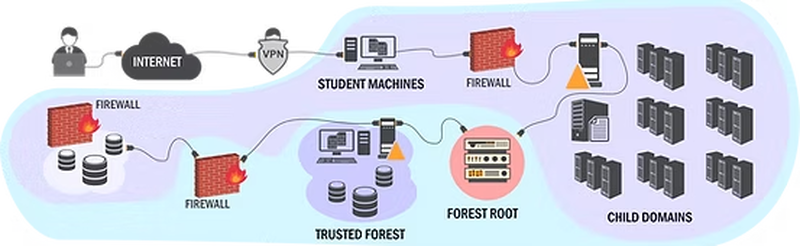
Tools covered span the full AD attack toolkit: PowerView, BloodHound/SharpHound, Mimikatz, Rubeus, Kekeo, PowerUpSQL, and more. The course explains what’s happening under the hood with Kerberos, NTLM, and trust relationships, not just how to run the tools.
Key Tools#
These are the tools that came up repeatedly in both the course and the exam:
| Tool | Purpose |
|---|---|
| PowerView | AD enumeration and reconnaissance |
| BloodHound / SharpHound | Attack path mapping and visualization |
| Mimikatz | Credential extraction, DCSync, Pass-the-Hash, Golden Tickets |
| Rubeus | Kerberos abuse (S4U, delegation attacks) |
| Kekeo | TGT requests and Kerberos manipulation |
| PowerUpSQL | SQL Server discovery and exploitation |
| PowerUp.ps1 | Local privilege escalation via service misconfigurations |
| powercat / Invoke-PowerShellTcp | Reverse shells and lateral movement |
The Exam#
The exam gave me 24 hours to compromise a multi-forest AD environment1, then 48 hours to write my report. In my run, no tools were pre-installed. I brought my own toolkit and set up my attack infrastructure from scratch.
The environment had a student VM plus multiple target machines across domain and forest boundaries to compromise.
The attack chain hit every major AD technique:
- Local privilege escalation via a service misconfiguration for an initial foothold
- Constrained delegation abuse using S4U (Service for User) to move laterally across machines
- Credential vault extraction to open new attack paths
- SQL Server compromise through linked servers to reach otherwise isolated systems
- DCSync to extract domain admin credentials directly from the domain controller
- Cross-forest Golden Ticket using SID (Security Identifier) history to jump from the child forest into the parent
AMSI Was a Pain#
Here’s a “real-world” lesson the course prepares you for: AMSI (Antimalware Scan Interface) catches your tools. Invoke-Mimikatz kept getting flagged, and I burned time trying to get it past AMSI before switching to Invoke-Mimi.ps1, a modified version that actually worked.
Attack Positioning Matters#
Another lesson: Golden Ticket attacks need to be executed from the right position. I generated a golden ticket from my student VM and couldn’t get it to work. After some frustration, I pivoted to the domain controller itself and ran it from there. Worked immediately.
Time and Reporting#
I finished the hands-on portion in roughly 8 to 16 hours of active work time. Not all at once. I took breaks, stepped back when I hit walls, and came back with fresh eyes. The 24-hour window felt less of a crunch than OSCP because it was just AD. I knew going in this was going to be a Windows Active Directory thing, so it felt less overwhelming. I was just focusing on this one domain of hacking.
The report was 117 pages. I used Obsidian to organize my notes during the exam and converted them into a structured report covering each attack path with screenshots, commands, and remediation recommendations. Hacking is cool and all, but it doesn’t really matter if you can’t report it well. Altered Security reviews your report, and vague “I ran Mimikatz and got DA” won’t cut it.
What I Learned#
CRTP filled in knowledge I’d been actively avoiding:
- Domain enumeration: PowerView and BloodHound became second nature
- Local and domain privilege escalation: service misconfigurations to Kerberos delegation abuse
- Lateral movement: PSRemoting, constrained delegation, S4U requests
- Domain persistence: DCSync, Golden Tickets
- Cross-forest trust exploitation: SID history abuse to break forest boundaries. This was the part of CRTP that stood apart from the OSCP AD modules for me
- AMSI bypass and evasion: practical, not theoretical
- Attack chain thinking: individual techniques are table stakes. Chaining them end-to-end across domains and forests is the actual skill
Pros and Cons#
Pros#
- Deep AD focus. The curriculum stays tightly on AD, with little spillover into web-app style content
- Nikhil Mittal’s expertise. Learning AD attacks from a respected researcher in the field
- Strong guide manual and labs. The guide manual is a genuine reference, and the lab environment is where this course earns its money
- Affordable. $249–$499 for dedicated AD depth
- Offense AND defense. A lot of red team training stays offense-heavy. This course still includes defense context
- Free renewal. Valid for 3 years, and the renewal exam is free
Cons#
- Less name recognition. HR departments and recruiters probably won’t know what CRTP is. OSCP still wins the “gets past the resume screen” game
- Very specific focus. AD only. If you need a general pentest cert, look elsewhere
- Self-paced discipline required. No cohort, no deadlines, no one checking on your progress
- Content currency. AD attack techniques evolve, and some material can feel dated as defenses improve
- Limited lab time. 30, 60, or 90 days depending on your tier. If life gets busy, you can run out
Who Should Get This?#
- Pentesters doing AD assessments
- OSCP candidates wanting stronger AD fundamentals before the exam
- Red teamers who need to go deep on AD attack chains
- Blue teamers who want to understand what attackers are actually doing in AD environments
Who Shouldn’t#
- If you’ve never logged into a terminal before, get some basics first
- People who aren’t comfortable with PowerShell and basic Windows navigation
- Anyone looking for a general pentest cert should probably go with OSCP or PNPT
- Those who need an HR-checkbox credential with name recognition
A big part of this exam is using pre-existing tools with slight manipulations. You’re trying to understand the methodology and work through it. You don’t need to be a PowerShell scripter, but you don’t want to get lost in a terminal.
Study Resources#
Supplementary resources if you want to go deeper or need additional practice:
| Resource | Notes |
|---|---|
| ired.team | Excellent AD attack reference with detailed technique writeups |
| HackTheBox Academy - AD modules | Hands-on AD practice labs |
| PayloadsAllTheThings - AD | Comprehensive AD attack cheatsheet |
| Awesome Active Directory | Curated AD attack and defense references, technique walkthroughs, and tooling notes |
| The Hacker Recipes | AD attack recipes with clear walkthroughs |
Final Thoughts#
I took CRTP because I had to, not because I wanted to. But the time I spent learning AD through this course, through other courses, and through daily-driving a Windows machine, I really got comfortable with it. I saw the power of how Microsoft built Active Directory and how those trust relationships and delegation models work.
The pattern recognition is what stuck with me. How relationships and trust work in AD maps onto a lot of things that aren’t AD at all. That was unexpected.
If AD environments are part of your picture (they almost certainly are), take this course.
Cost: $249–$499 (30/60/90-day lab access tiers)2
Renewal: Free exam before expiry; 3-year validity; free renewal process (without CPE-style reporting requirement)3
Official Page: alteredsecurity.com/adlab
Certified Red Team Professional (CRTP) (24-hour hands-on exam, five target servers, multi-domain/multi-forest scope) ↩︎ ↩︎
CRTP lab pricing (30-day $249 / 60-day $379 / 90-day $499 options, with one exam attempt included) ↩︎ ↩︎
CRTP ownership transition and renewal policy (official policy context for transition away from Pentester Academy; 3-year validity and free renewal path) ↩︎ ↩︎
CRTP lab setup (Server 2022 lab environment, multi-domain/forest learning content, lifetime learning materials) ↩︎