This is exactly the problem that Model Context Protocol (MCP) servers can solve. In this post, I’ll show you how I built a custom MCP server that gives Claude direct access to PCI-DSS requirements—turning compliance research from tedious manual work into natural conversation.
What is MCP?#
MCP (Model Context Protocol) is an open standard that lets AI assistants like Claude call external tools. Instead of pasting data into prompts, you expose structured APIs that the AI can use directly.
Think of it as giving Claude a set of specialized functions it can call when needed—search a database, fetch a document, or query an API.
The Problem: 323 Requirements Across 12 Domains#
PCI-DSS v4.0.1 has 323 individual requirements organized into 12 principal domains. They’re hierarchical (1 → 1.1 → 1.1.1 → 1.1.1.1), and finding relevant requirements means knowing both the structure and the terminology.
Traditional approach:
- Download the PDF or Excel file
- Search manually with Ctrl+F
- Cross-reference parent/child requirements
- Repeat for every question
MCP approach:
“What are the network security requirements?”
Claude calls
search_requirements("network security"), returns structured results
Design Principles#
Before building, it’s worth understanding some key principles from The Pragmatic Engineer’s MCP deep dive:
Design for Agents, Not Humans#
MCP servers are called by AI assistants, not humans directly. This means:
- Return structured JSON, not formatted text
- Include metadata that helps the AI understand context
- Provide clear error messages with suggestions
Start Internal, Then Public#
Most successful MCP deployments start as internal tools. Security is easier when you control both the client and server. This is especially important for compliance data.
Keep It Focused#
One MCP per domain. Don’t try to build a Swiss Army knife—build a sharp blade for a specific purpose.
Building the Server with FastMCP#
I used FastMCP, the leading Python framework for MCP development. It’s decorator-based and feels natural if you’ve used Flask or FastAPI.
Here’s the core server:
from fastmcp import FastMCP
import json
from pathlib import Path

mcp = FastMCP("pci-dss-compliance")

# Load requirements at startup
data = json.loads(Path("requirements.json").read_text())
REQUIREMENTS = {r["id"]: r for r in data["requirements"]}

@mcp.tool()
def get_requirement(id: str, include_children: bool = False) -> dict:
    """Get a specific PCI-DSS requirement by ID."""
    req = REQUIREMENTS.get(id)
    if not req:
        return {"error": f"Requirement {id} not found"}

    result = {"requirement": req}
    if include_children:
        result["children"] = [
            r for r in REQUIREMENTS.values()
            if r.get("parentId") == id
        ]
    return result

@mcp.tool()
def search_requirements(query: str, limit: int = 10) -> dict:
    """Search PCI-DSS requirements by keyword."""
    query_lower = query.lower()
    matches = [
        {"id": r["id"], "title": r["title"]}
        for r in REQUIREMENTS.values()
        if query_lower in r["title"].lower()
    ]
    return {"query": query, "count": len(matches), "results": matches[:limit]}

@mcp.tool()
def list_requirements(level: int = None, limit: int = 20) -> dict:
    """List requirements, optionally filtered by hierarchy level."""
    if level:
        reqs = [r for r in REQUIREMENTS.values() if r["level"] == level]
    else:
        reqs = list(REQUIREMENTS.values())
    return {"level": level or "all", "count": len(reqs), "requirements": reqs[:limit]}

if __name__ == "__main__":
    mcp.run()
Three tools, each doing one thing well:
- get_requirement: Fetch by ID, optionally with children
- search_requirements: Keyword search across titles
- list_requirements: Browse by hierarchy level
Testing with MCP Inspector#
The MCP Inspector is the official debugging tool. Run it with:
npx @modelcontextprotocol/inspector python compliance_server.pyThis opens a web UI where you can see all available tools and test them interactively:
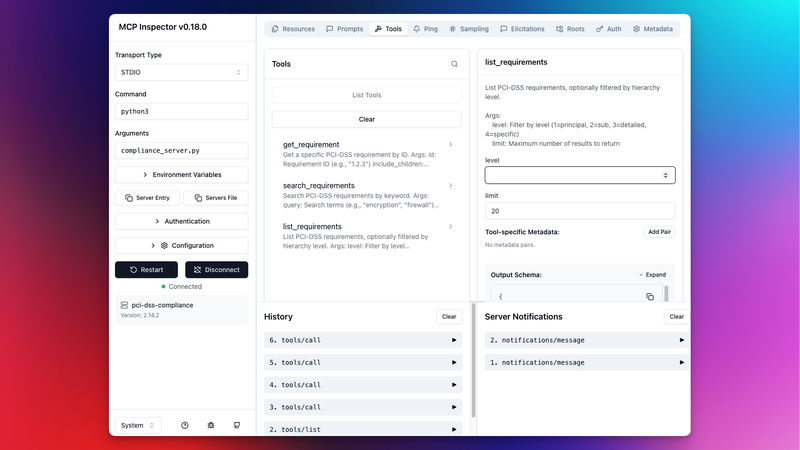
The inspector shows each tool’s schema, lets you fill in parameters, and displays the JSON response. Essential for debugging before connecting to Claude.
Security Considerations#
Compliance data is sensitive. A few guidelines:
Deploy inside your firewall. Run MCP servers on internal networks only. Never expose compliance data to public endpoints.
Least privilege access. Only expose read operations. Don’t include admin or configuration tools unless absolutely necessary.
Data handling. Be careful with PII in audit evidence. Follow your organization’s data classification policies.
As The Pragmatic Engineer notes:
“Security’s still the Achilles heel of MCPs and LLMs”
Best practices are still emerging. Stay updated with the official MCP security guidelines.
What’s Next#
This same pattern works for any compliance framework:
- NIST 800-53: Change the ID regex to match
AC-1,AC-1(1)patterns - ISO 27001: Adjust for
A.5.1.1format - SOC 2: Map trust services criteria
The full implementation—including Excel parsing, indexing, and the FastMCP server—is available as a Jupyter notebook you can run in Google Colab.
Resources#
External:
Related posts:
- The Problems with MCP - Context overhead, security concerns, and when MCP makes sense
- FedRAMP Docs MCP Server - A 23-tool MCP server for FedRAMP documentation
- I Built a GRC Agent for $10 - The agent pattern for compliance automation